


Themes
sysc-greet includes multiple color themes. Themes affect the entire color scheme of the greeter including backgrounds, borders, text, and accent ele...
sysc-greet includes multiple color themes. Themes affect the entire color scheme of the greeter including backgrounds, borders, text, and accent elements.
Available Themes
| Theme | Primary Color | Description |
|---|---|---|
| Dracula | #bd93f9 | Dark purple-blue theme |
| Gruvbox | #fe8019 | Warm dark theme |
| Material | #80cbc4 | Material Design dark theme |
| Nord | #81a1c1 | Arctic blue-toned dark theme |
| Tokyo Night | #7aa2f7 | Modern dark theme |
| Catppuccin | #cba6f7 | Soft pastel dark theme |
| Solarized | #268bd2 | Solarized dark theme |
| Monochrome | #ffffff | Black and white minimal theme |
| TransIsHardJob | #5BCEFA | Transgender flag colors |
| Eldritch | #37f499 | Purple and green theme |
| RAMA | #ef233c | RAMA keyboard aesthetics |
| Dark | #ffffff | True black and white minimal theme |
| Ayu | #e6b450 | Dark theme with a gold primary and green and blue accents |
| Amber | #ffc107 | Brown-black with amber accents |
| Blue | #42a5f5 | Blue-grey with a blue primary |
| Purple | #d0bcff | Near-black with Material violet |
| Green | #4caf50 | Green-black with a green primary |
| Orange | #ff6d00 | Brown-black with an orange primary |
| Coral | #ffb4ab | Brown-black with a soft coral primary |
| Cyan | #00bcd4 | Dark slate with a cyan primary |
| Eldritch-Abyss | #2dcc82 | Deep indigo with green, teal, and violet accents |
| Kanagawa | #76946a | Ink-wash dark theme with pine and wave blue accents |
| Noctalia | #fff59b | Midnight blue with pale yellow, periwinkle, and mint accents |
| Pink | #e91e63 | Brown-black with a magenta-pink primary |
| Red | #f44336 | Brown-black with a red primary |
| Rose-Pine | #ebbcba | Warm rose and foam accents on a plum base |
| Void | #ffffff | True black with a white primary |
Fifteen themes ship as TOML files in /usr/share/sysc-greet/themes/: Ayu, Amber, Blue, Coral, Cyan, Eldritch-Abyss, Green, Kanagawa, Noctalia, Orange, Pink, Purple, Red, Rose-Pine, and Void. Ayu, Amber, Blue, Purple, Green and Orange use the same names and palette colors as sysc-shell. To change one, copy it to ~/.config/sysc-greet/themes/; a user theme with the same name wins.
Changing Themes
Press F1 → Themes to cycle through available themes. Your selection is saved automatically.
Use --theme blue to choose a startup theme. Names are case insensitive; an explicit theme overrides the saved selection. Test mode ignores saved preferences.
Custom Themes
Create custom themes by placing TOML files in:
/usr/share/sysc-greet/themes/(system-wide)~/.config/sysc-greet/themes/(user)
Custom themes appear in F1 → Themes alongside built-in themes.
Format
# my-theme.toml
name = "My Theme"

[colors]
bg_base = "#1a1a2e"
bg_active = "#2a2a3e"
primary = "#e94560"
secondary = "#0f3460"
accent = "#16213e"
warning = "#f59e0b"
danger = "#ef4444"
fg_primary = "#ffffff"
fg_secondary = "#cccccc"
fg_muted = "#888888"
border_focus = "#e94560"
All color fields are required. Use hex format (#RRGGBB).
Example themes are provided in the repository at examples/themes/.
Community Examples
Piink
A vibrant pink and magenta theme by Pat8998.
# piink.toml
name = "Piink"

[colors]
bg_base = "#000000"
bg_active = "#ad1a5d"
primary = "#f72585"
secondary = "#a71aad"
accent = "#f72585"
warning = "#ffff00"
danger = "#ff0000"
fg_primary = "#ee33ee"
fg_secondary = "#a125f7"
fg_muted = "#ee33ee"
border_focus = "#711aad"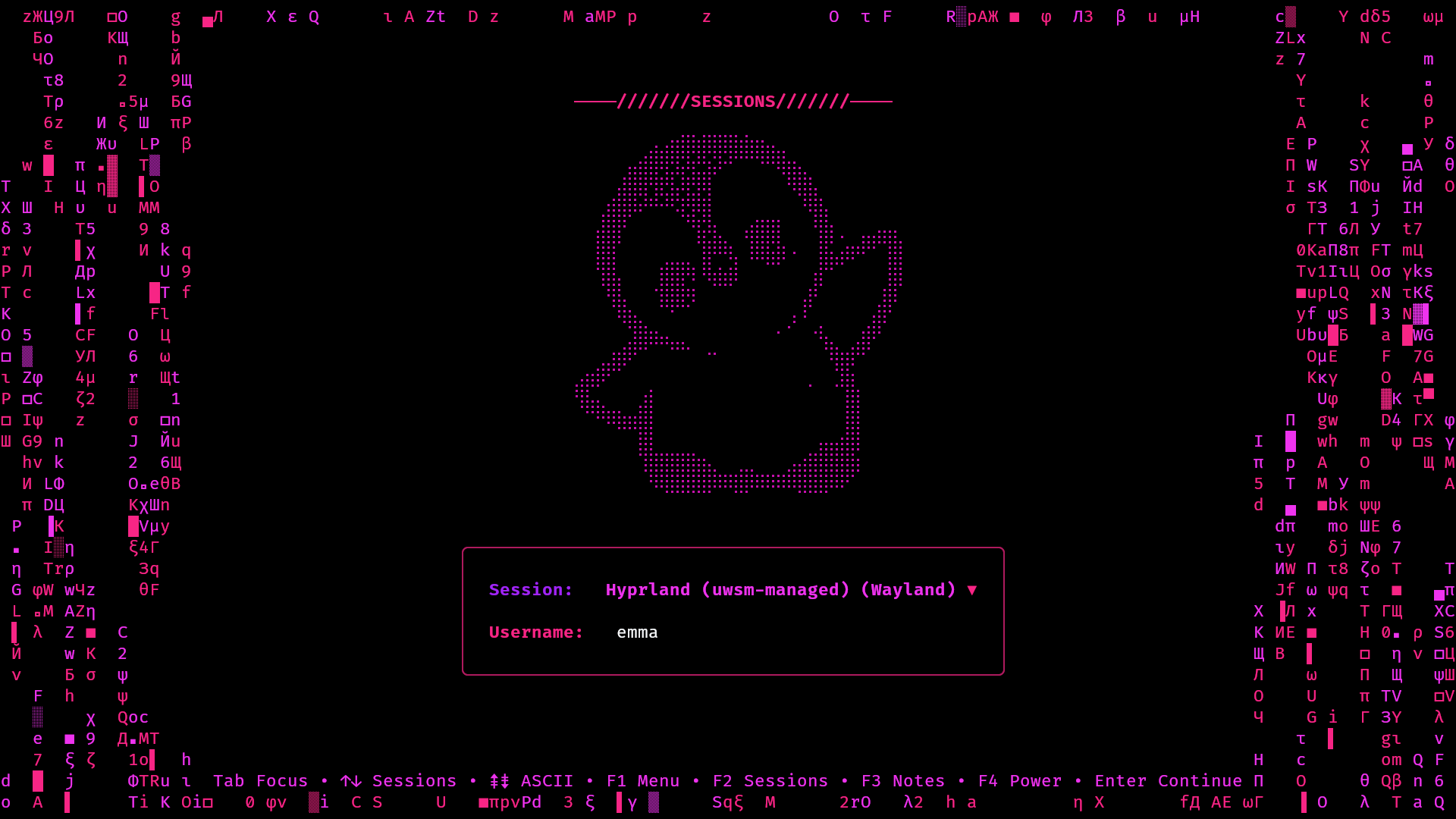
This theme also pairs well with a custom ASCII config using braille-art. See examples/themes/piink.toml in the repository.
Have a custom theme you'd like to share? Open an issue and we'll add it here.
Generating Wallpapers
After adding a new theme, regenerate wallpapers to include theme-matched backgrounds:
cd scripts/
python3 generate-wallpapers.py
This creates wallpapers for all themes in /usr/share/sysc-greet/wallpapers/. See Wallpapers for more options.
Background Effects
Custom themes color the built-in effects, including Fire, Matrix, ASCII Rain, Fireworks, Aquarium, Sonar, Cracktro, Plasma, AK-47, Australian SLR, Higgs Field, and rotating models. The effects use palettes derived from your theme's colors:
- Fire uses
bg_base→warning→danger→primarygradient - Matrix uses
bg_base→secondary→primaryfor the falling characters - Rain uses
primary,secondary,accentfor the drops - Fireworks uses all accent colors for variety
No additional configuration needed - just select your custom theme and enable an effect.
Kitty color output
greetd starts sysc-greet as a fullscreen Kitty process under the selected Wayland compositor. Kitty provides the TrueColor profile used by the greeter. Color profile fallback behavior is not a substitute for testing the greeter in Kitty on the target compositor.